Shop
Networking
Bulk Wire & Cable
Cables
Racks & Enclosures
Tools
Audio/Video/Home
HDMI
Mounts
Security
Adapters
Usb/Mobile/Tablet
Electrical
Technical Furniture
Shop Brands
FireFold
ICC
Intellinet Network Solutions
Jonard Tools
j5create
Kendall Howard
Netstrand
Paige Electric
Platinum Tools
Quest
Rhino Brackets
SimplyBrands
Structured Cable Products
Vanco
Vertical Cable
Wavenet
World Cord Sets
View All
About Us
Customer Service
Returns
Order Status
Shipping Policy
Customer Reviews
Contact Us
70497971000
Support@FireFold.com
Free Shipping on Orders > $99.99 - * Exclusions Apply - LABORDAY10 • 10% Off Select Items
Filter
Free Shipping
Select Options
4K HDMI Switch with 3D, UHD-HDR Support, 60Hz - 3x1, 4x1, 5x1
Whether you need an HDMI 3 switch or 5 switch, we have them both in 2.0. Select the number of ports you need from the drop down menu based on how many devices you want to connect to your TV.
This HDMI switcher for TV comes with the FireFold 60 Day Guarantee, which means you can return it in its original condition for any reason for up to 60 days after purchase. It also has a one year warranty, so if it fails due to manufacturer defects during the first year after purchase, we will replace it to keep you going.
On Sale from $41.99
Cat5E RJ45 10/100 Type 7 Base-T Pigtail Ethernet Splitter
The Type 7 Cat5E RJ45 Pigtail Cable Splitter is designed to separate the 4-pair configuration into two 2-pair sets. This allows you to operate two devices over a single Cat5e cable to prevent having to run another wire. To function correctly, each network-capable device you use requires its own IP address. This includes computers, mobile devices, printer, VoIP phones, and many other home and office essentials. Using a splitter improperly can cause many performance issues including unreliable or slow connections. To avoid this problem, you will need two of the CAT5ESPLITTER splitters.
To use a Cat5E splitter, you connect two cables from your router or switch to one splitter then attach your splitter to the single Ethernet run. Then, on the other side of the run, you connect your second Ethernet splitter and then run two cables to each device. There are several wiring variations available for Cat5e splitters, but type 04 is the most commonly used. Even though Ethernet splitters will allow you to connect two devices to one wire, it is still advised that only one device be used at a time.
Please note: this splitter is designed specifically for use with Ethernet phones and cannot split all Internet devices. Each device connected to this splitter must be able to operate on a unique IP address for it to function properly. Many devices are unable to do this. In this case, you would need to use a network switch.
$5.85
HDMI Splitter 4K@60Hz, HDCP 2.2
The FireFold 4K HDMI Splitter allows you to send HDMI signal to two different HDMI displays or monitors simultaneously using the same signal source such a Blue-ray, computer or any other HDMI enabled device.
Note: The 1x8 variant contains EDID switches.
What is EDID? Extended Display Identification Data (EDID) is a metadata standard that lets display devices like monitors, televisions, and projectors communicate their capabilities to the video source. When using HDMI, the EDID from your television tells the video source what the dimensions of the screen are.
From $44.56 - $151.49
Cat5E Splitter - 10/100 Type 8 Base-T Pigtail RJ45 Splitter
The CAT5E2PAIRSPLIT is a Type 08 RJ45 splitter, designed to separate the 4-pair configuration into two 2-pair sets. This allows you to operate two devices over a single Cat5e cable to prevent having to run another wire. To operate correctly, each network-capable device you use requires its own IP address. This includes computers, mobile devices, printer, VoIP phones, and many other home and office essentials. Using a splitter improperly can cause many performance issues including unreliable or slow connections. To avoid this issue, you will need two of the CAT5E2PAIRSPLIT splitters.
To use a Cat5E splitter, you connect two cables from your router or switch to one splitter then attach your splitter to the single Ethernet run. Then, on the other side of the run, you connect your second Ethernet splitter and then run two cables to each device. Even though Ethernet splitters will allow you to connect two devices to one wire, it is still advised that only one device be used at a time.
$5.94
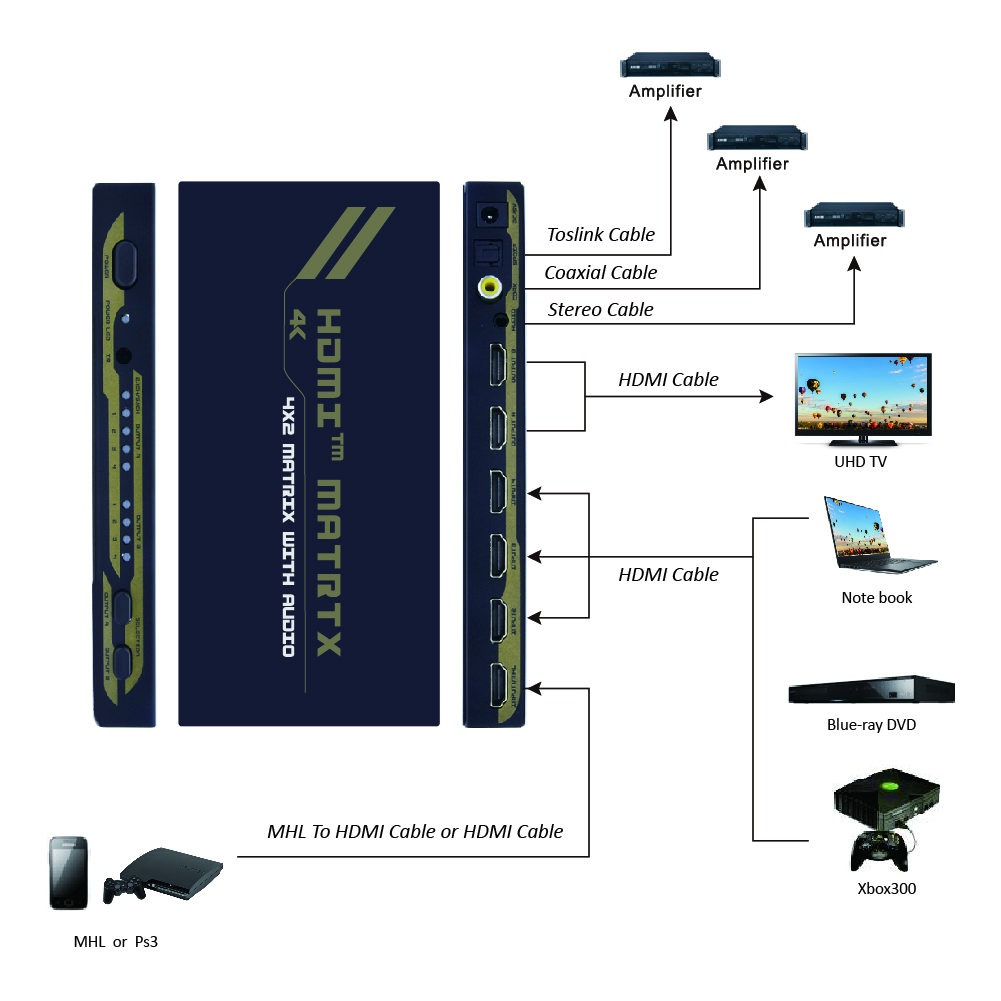
4x2 HDMI Matrix Switch with Audio 4K @ 30Hz
The 4K HDMI Matrix Switch allows you share up to 4 distinct HDMI with audio, between 2 independent displays or projectors. This matrix switch allows each input and the corresponding audio to be switched individually, meaning that different two A/V sources can be shown on each output, or a single source can be output to two, offering maximum flexibility.
$82.47
Composite 3 RCA Audio Video Switch
To select two or four A/V input sources (VCR, Stereo CD player or DVD) to TV output.
From $12.43 - $17.55
4x1 VGA Switch with 3.5mm Audio
Connect up to four computers to one monitor with this 4 x 1 VGA Switch with 3.5mm audio. It's easy to use, just plug and play. No external power is required.
$33.42
Composite 3 RCA Audio Video Splitter
From $23.25 - $30.08
HDMI 4x4 Matrix with IR Remote Control Extension, 1080p
The HDMI 4x4 Matrix with IR Remote Control Extension, 1080p is a true matrix 4 x 4 switch, up to 4 source devices and up to 4 displays can be connected. You can have the same video mirroed on all displays, or use the switch to send different video to each monitor. Input source for each display is selected by pushig button on HDMI matrix box, or using remote control.
** IR Extension function **IR Extension function allows you to extend remote control IR signal through HDMI cable. Say you have a TV and cable box in the living room, and second TV in the bed room upstairs. You can change cable channel either in the living room or on the bed upstarirs with the cable box remote control. You do not have to go downstairs each time you want to change cable channel.
NOTE: IR remote control adapters are sold separately.
$271.39




 ×
×
×
×